Chapter Donation Page(s)
A donation page is one of the Eventgroove Fundraising tools to help your chapter take online donations. Chapters can create a general donation page or build a project specific donation page. You will need to connect the Chapters Stripe account and then push it live.
To get started, you will need to added as an Admin (multi-user) to your chapters account. We can add several admins (multi-users) from your chapter volunteer team for access and to help manage events and fundraising. Please reach out to doug.agee@tu.org with your team's full name and email address.
Donation page guide...
The Donation Page tool is in the TU Fundraising Center at go.tulocalevents.org. Once you have been added as an Admin, you will find the link to the Donation Page in the Admin panel on the left navigation under Settings. Please let me know if you are not seeing your chapter profile.
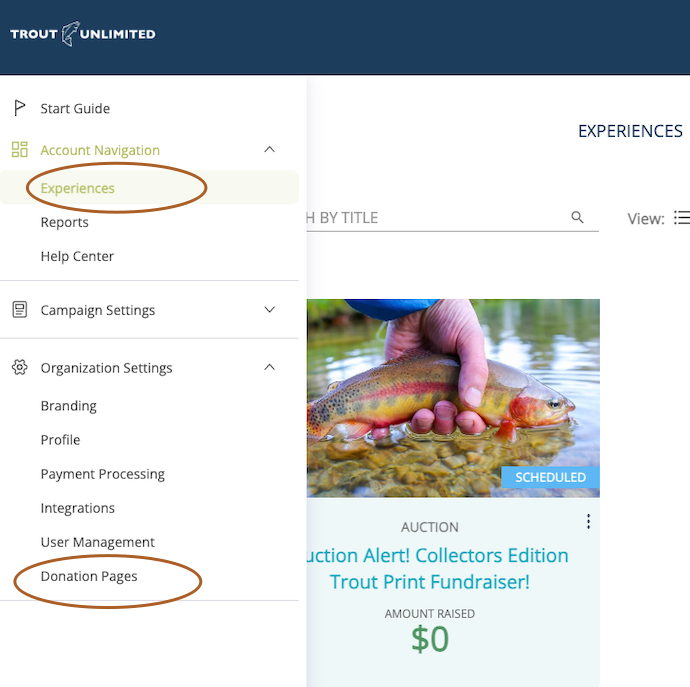
We are glad to set up a draft donation page to get you started. Feel free to edit and push the page live to start taking online donations.
You will need to make sure you have a Stripe account activated under Payment Processing. Here is how to add your Chapter’s Stripe account.
Need more help?
If you need additional assistance on events and fundraising for your chapter, reach out to Doug Agee <Doug.Agee@tu.org> or Sean Sieler <sean.sieler@tu.org>. We encourage you to post you event tips and questions in the Leaders Forum (link here) which will help other chapters and volunteers.